How to Create Your Own Software Factory
A couple of years ago, when people thought software engineering was solved, I bet they weren’t aware that we just created new problems.
That is because there isn’t a single way to use AI for coding.
Remember, it started with us hitting Tab Tab Tab on Cursor’s suggestions a few years ago, and we were amazed it wrote exactly what we’d been thinking about (or really close to it)!
Fast forward to today, you might just tell your agent what to do.
But you might use Plans, PRDs, and different models as subagents.
All these approaches will give you slightly different results (not saying better or worse, just different).
Agentic coding has come a long way, and we are so early that there are unlimited problems to solve.
But how would you solve the most daunting thing in software engineering, the only repetition that exists since you make software: working through issues?
Whether you did Kanban, Agile, or chaos-driven development, you were wondering if you could just tell the agent:
Here’s a board with issues. Work on them, raise PRs, verify, and merge them if they satisfy certain criteria. Make me a coffee at the end.
This is how software factories were born.
The Simplest Software Factory You Can Build
Mine right now has three components:
- build
- review
- learn
Think of a factory with two levels:
- The first level picks up the work and prepares the implementation.
- The second level reviews the changes, verifies them, and either reports back to level 1 or merges the changes.
- The third, optional level, takes the learnings from the agent conversations and self-improves the process by updating your prompts.
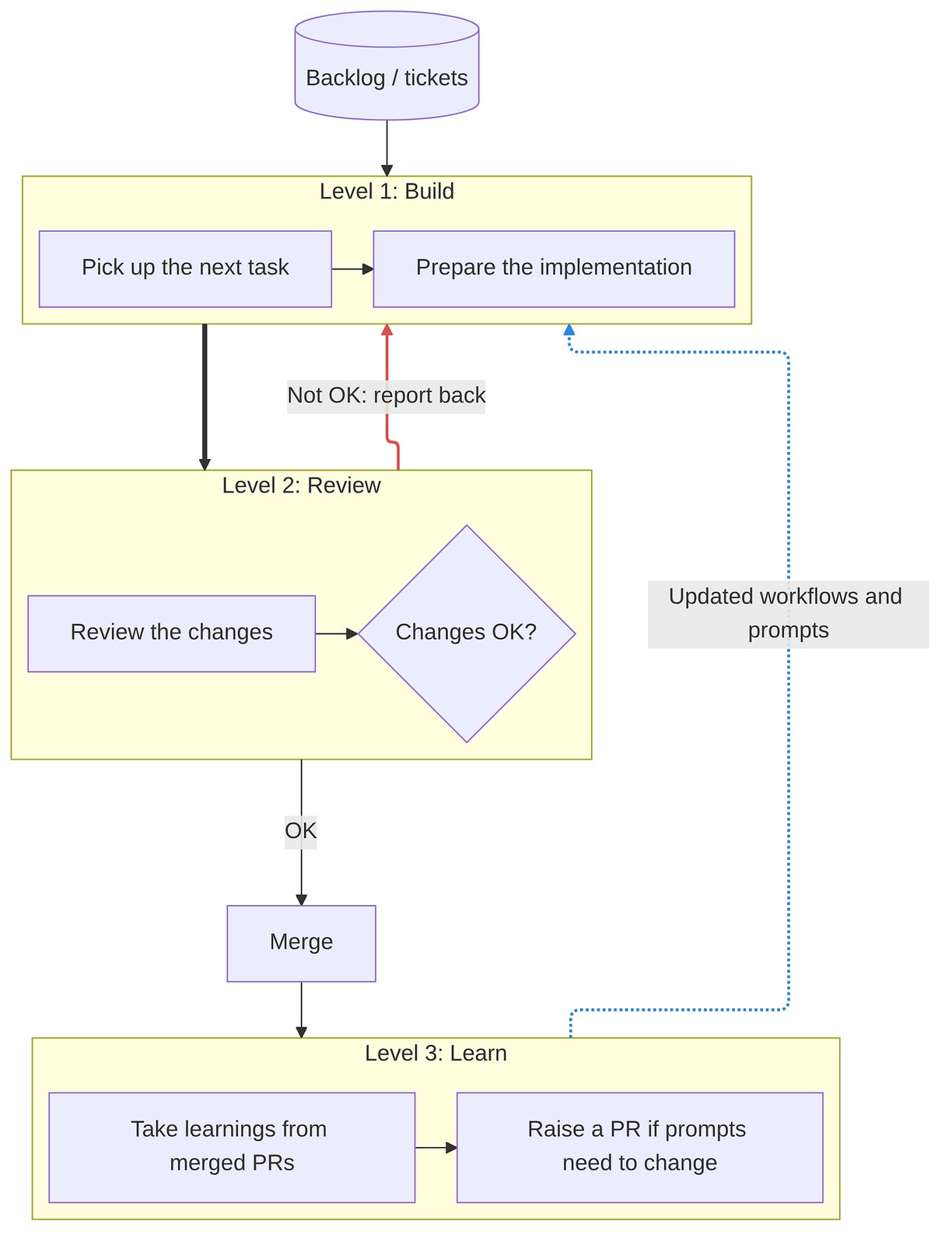
Let’s walk through the purpose of each and how you can set them up.
Build
You need a way to trigger the factory.
This can be manual, or you can listen to issue-created events with webhooks in your issue tracking software of choice.
For my use case at work, I’m not automatically picking tasks (I know skills issue, must work on it). Instead, I’m instructing Claude to work on a specific ticket, so the first level of the software factory happens on my machine.
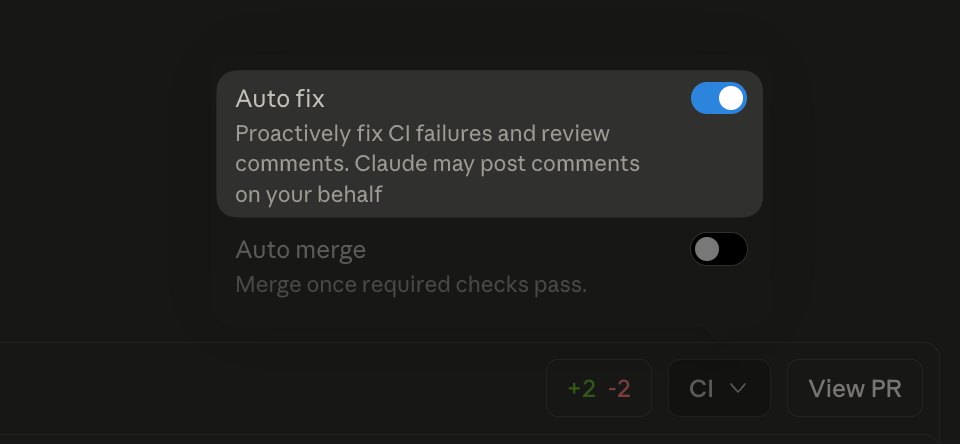
The build step is also rerun whenever the Review step of the factory leaves comments on your PR. For complete automation, if you are using Claude Desktop, you can just turn this flag on and see the two agents communicate:
Review
This is probably the most important step.
If this passes, your agent might merge code (depending on your repository settings) on your behalf, so better be careful here.
Correctness
One of the worst mistakes is probably just leaving the “code review” part to the agent. Identifying bugs, security issues, and maybe styling problems at the code level. I think this is a huge, huge mistake, and this should be only the first part of the review.
Behavior
The second step, which is more important, is to check if the presented code change leads to the expected change in behavior.
I’m verifying in two ways:
- e2e and integration tests
- video recording of the feature
If what was implemented is a user-facing thing, I ask the Build agent to record a video while clicking through the new stuff that this PR adds. This is for me and other teammates to watch and decide if the requested feature was implemented.
This is how a GitHub workflow doing this with the organization-wide Claude app would look:
Subscribe to get the full workflow file.
Learn
This step will save you from a lot of manual work and asking Claude all the time to update your prompts.
A simple learn step in your factory completes the feedback loop because once the PR is merged, it can simply look at the discussion between the agents and figure out which agent instructions need to be updated so that a problem that one of the agents found doesn’t repeat in the future.
To give you a classic example, let’s say the review agent rejected a PR against the acceptance criteria in the JIRA ticket.
It found something that hasn’t been implemented that has an AC.
But what happened is that someone decided to skip that AC, but instead of editing the issue body, they documented this finding in a JIRA comment.
However, the reviewer agent wasn’t checking the comments in tickets, only the ticket body.
In this case, the feedback loop would take the learning that the reviewer agent should not only look at the Jira ticket bodies but also the comments. It would update the prompt of the reviewer agent and raise a PR.
This is how it looks in practice:
Subscribe to get the full workflow file.
Gotchas
Routines
Now you might say, but we have Routines in Claude. Why not use those?
Believe me, we tried.
We all set up routines, and the following thing happened;
- Multiple PR reviews: Sure, we had checks like don’t review a PR that’s already reviewed. However, if an agent just started the review, there was no way to tell. Even if you use tags, for example, to mark PRs in review, there’s a small window when more agents can start before seeing the tag.
- Inconsistent results: We all had slightly different prompts, so whether was a PR rejected or approved often depended on whose agent did the review and what they had saved in Routines.
Codeowners
Depending on your repo merge rules, you might have to add the bot to codeowners if you want its approval to unblock you from merging your own PR.
Skills
If you have organization-wide pr review and other skills, they might not be available straight away in your Claude app that your GitHub Workflow interacts with. Ask your organization admin to make those available in the GitHub Claude app.
Separate MD files
As soon as you start using the factory, you’ll also start updating your GitHub workflows, and likely the prompts inside of them.
If your organization uses code quality checkers like SonarQube, they’ll be super unhappy with you changing GitHub Actions workflow files.
That is why I recommend moving the prompts into separate .md files that the workflow references.
Now, when you change the prompt, Sonar won’t complain.
How your software factory looks like?
What did you learn while building it?
I read and reply. :)
📰 Weekly shoutout
📣 Share
There’s no easier way to help this newsletter grow than by sharing it with the world. If you liked it, found something helpful, or you know someone who knows someone to whom this could be helpful, share it:
🏆 Subscribe
Actually, there’s one easier thing you can do to grow and help grow: subscribe to this newsletter. I’ll keep putting in the work and distilling what I learn/learned as a software engineer/consultant. Simply sign up here: